

What is a CI/CD Pipeline and How it Works?
What is a CI/CD Pipeline?
A CI/CD pipeline is an automated workflow that enables development teams to deliver code changes quickly and reliably from development to production. The CI/CD pipeline meaning encompasses two fundamental practices: Continuous Integration (CI) and Continuous Deployment/Delivery (CD).
CI/CD Full Form and Meaning
| Term | Full Form | Definition |
|---|---|---|
| CI | Continuous Integration | The practice of automatically building, testing, and validating code changes as soon as they're committed to version control |
| CD | Continuous Deployment/Delivery | The automated process of deploying validated code changes to production environments |
The CI and CD meaning together represents a comprehensive approach to software delivery that emphasizes automation, speed, and reliability.
How CI/CD Pipelines Work
Understanding how these automated workflows function is essential for modern development teams. A typical CI/CD process follows these sequential stages:
1. Source Code Management
Developers push code changes to a version control system (Git, SVN, etc.), triggering the pipeline automatically.
2. Continuous Integration Stage
- Build: Compile source code and create deployable artifacts
- Test: Run automated tests (unit, integration, security)
- Quality Gates: Code analysis, security scanning, compliance checks
3. Continuous Deployment Stage
- Staging Deployment: Deploy to testing environments
- Production Deployment: Automated release to live environments
- Monitoring: Track deployment success and application health
These automated stages work together to ensure code quality while maintaining rapid delivery cycles.
Key Benefits of CI/CD Pipelines
Implementing CI/CD pipelines transforms how development teams operate, delivering measurable improvements across multiple areas:
Faster Time to Market: Automated processes eliminate manual bottlenecks, enabling multiple daily releases instead of monthly deployments.
Improved Code Quality: Automated testing and quality gates catch issues early, reducing bugs in production.
Reduced Risk: Smaller, frequent deployments are easier to troubleshoot and roll back if needed.
Enhanced Collaboration: Standardized processes improve communication between development, testing, and operations teams.
Better Observability: Integration with monitoring tools and observability platforms provides visibility into deployment impact and system health.
Common CI/CD Pipeline Examples
To better understand how these concepts work in practice, let's examine both simple and complex pipeline implementations:
Basic Web Application Pipeline
# Example GitHub Actions workflow
name: CI/CD Pipeline
on: [push]
jobs:
  build-and-deploy:
    runs-on: ubuntu-latest
    steps:
    - uses: actions/checkout@v3
    - name: Install Dependencies
      run: npm install
    - name: Run Tests
      run: npm test
    - name: Build Application
      run: npm run build
    - name: Deploy to Production
      run: ./deploy.sh
Enterprise Pipeline Stages
- Code Commit → Trigger pipeline
- Build & Package → Create deployable artifacts
- Automated Testing → Unit, integration, security tests
- Quality Analysis → Code coverage, static analysis
- Staging Deployment → Deploy to test environment
- User Acceptance Testing → Manual or automated validation
- Production Deployment → Release to live environment
- Post-Deployment Monitoring → Health checks and alerts
Popular CI/CD Tools
The choice of CI/CD tools significantly impacts your pipeline effectiveness. Popular options include GitHub Actions for GitHub users, GitLab CI for integrated DevOps workflows, Jenkins for maximum customization, and cloud-native solutions like Azure DevOps or CircleCI for managed infrastructure.
For teams implementing advanced monitoring, integrating observability tools with CI/CD pipelines provides valuable insights into deployment success and application performance.
Continuous Integration vs Continuous Delivery vs Continuous Deployment
Understanding the distinctions between these related concepts is crucial for implementing the right approach for your organization:
| Approach | Automation Level | Manual Approval | Description |
|---|---|---|---|
| Continuous Integration | Build & Test | Required for deployment | Focuses on automatically building and testing code changes |
| Continuous Delivery | Build, Test & Package | Required for production release | Ensures code is always ready for production deployment |
| Continuous Deployment | Full automation | No manual intervention | Every successful build automatically deploys to production |
Getting Started with CI/CD
For teams new to CI/CD, a structured approach ensures successful adoption without overwhelming existing workflows:
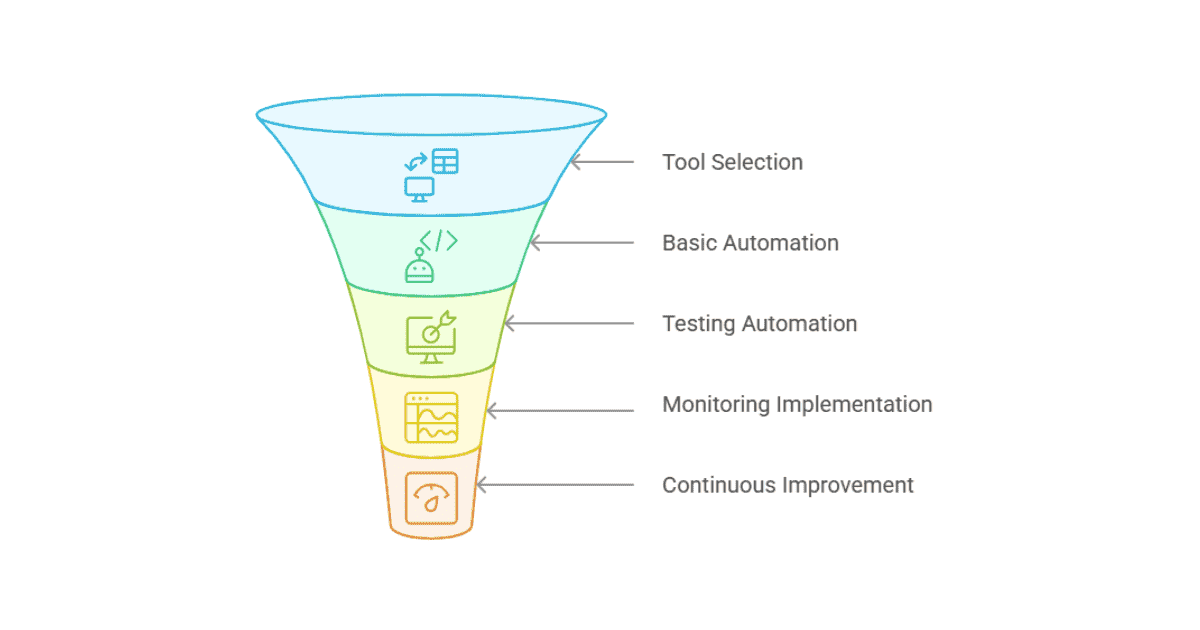
Common Challenges
While CI/CD offers significant benefits, teams often encounter predictable obstacles during implementation:
Pipeline Complexity: As projects grow, pipelines can become difficult to maintain. Solution: Use modular, reusable pipeline components.
Test Reliability: Flaky tests can slow down the entire process. Solution: Invest in stable test infrastructure and regular test maintenance.
Security Integration: Balancing speed with security requirements. Solution: Implement "shift-left" security practices with automated scanning.
Cultural Adoption: Teams may resist automation. Solution: Start with small wins and demonstrate value gradually.
Measuring CI/CD Success
Tracking the right metrics helps teams understand the impact of their CI/CD implementation and identify areas for improvement:
| Metric | Description | Target Range |
|---|---|---|
| Build Success Rate | Percentage of successful builds | >95% |
| Build Duration | Time from commit to deployable artifact | <10 minutes |
| Deployment Frequency | How often you deploy to production | Multiple times per day |
| Lead Time | Time from code commit to production deployment | <1 day |
| Mean Time to Recovery (MTTR) | Time to fix failed deployments | <1 hour |
Related Concepts
- DevOps: Cultural practice that CI/CD pipelines enable
- Infrastructure as Code: Managing infrastructure through automated scripts
- Observability: Monitoring and understanding system behavior through comprehensive tooling
- IT Monitoring: Tracking system performance and health metrics
- Microservices: Architecture pattern that benefits from CI/CD automation
CI/CD pipelines are fundamental to modern software development, enabling teams to deliver high-quality software faster and more reliably than traditional manual processes.
FAQ
- What's the difference between CI/CD pipelines and traditional deployment?
Traditional deployment involves manual steps, infrequent releases, and higher risk of errors. CI/CD pipelines automate the entire process, enable frequent deployments, and reduce human error through consistent, repeatable workflows.
- How long should a CI/CD pipeline take to run?
For optimal developer feedback, aim for pipelines under 10 minutes. Critical paths should complete in 5-7 minutes, with longer comprehensive tests running in parallel or scheduled separately.
- What's the difference between continuous delivery and continuous deployment?
Continuous delivery ensures code is always ready for production but requires manual approval for release. Continuous deployment automatically deploys every successful build to production without human intervention.
- Can small teams benefit from CI/CD pipelines?
Yes! Small teams often benefit more from CI/CD because automation compensates for limited resources. Start with simple workflows using free tools like GitHub Actions or GitLab CI.
- What are the most common CI/CD pipeline failures?
Common failures include flaky tests, environment configuration issues, dependency problems, and insufficient test coverage. Proper monitoring and gradual rollout strategies help mitigate these issues.
- How do I secure my CI/CD pipeline?
Use secure credential management, implement least-privilege access, scan for vulnerabilities automatically, audit pipeline permissions regularly, and never store secrets in code repositories.
- What's the ROI of implementing CI/CD pipelines?
Teams typically see 30-50% reduction in deployment time, 60-80% fewer production bugs, and significant improvement in developer productivity within 3-6 months of implementation.
- How do CI/CD pipelines handle database changes?
Database changes require careful planning with migration scripts, rollback procedures, and compatibility testing. Use database versioning tools and implement blue-green deployment strategies for complex schema changes.
You may also be interested in: