

Querying spans
Uptrace provides a powerful querying language that enables you to filter, group, and aggregate your observability data effectively. For the complete list of fields, functions, and operators, see the reference. The query language supports filters (where _status_code = "error"), grouping (group by _group_id), and aggregates (p50(_dur_ms)).

Prerequisites for Effective Querying
To write useful and performant queries, you need to pre-process raw data to ensure it has a well-defined structure. You can achieve this by:
- Recording contextual information in span attributes and events
- Using structured logging for logs
For searching over spans and logs (as opposed to complex querying), Uptrace supports a more concise syntax described in the searching documentation.
Query Language Components
Identifiers
Identifiers are unquoted strings that reference span fields, attributes, and extract values from JSON. Examples include _name, _display_name, and _dur_ms.
Important: Span fields start with an underscore to distinguish them from attributes.
Built-in Span Fields
The fields you use most are _name, _display_name, _dur_ms, _status_code, _time, and _group_id. _dur_ms also answers to _duration and _dur.
The reference lists all 17 fields with their types.
Attribute Names
Attribute names are normalized by replacing dots with underscores. Common examples include:
| Attribute Name | Description |
|---|---|
display_name | display.name attribute |
service_name | OpenTelemetry service.name attribute |
Data Types
Uptrace discovers an attribute's type from the data, so most queries never mention a type at all. You only need to annotate one when the same attribute holds different types across records, which makes the discovered type ambiguous:
foo::string | foo::int
The reference lists the comparison operators each type accepts, the three ways to quote a string, and how a unit suffix in an attribute name changes the way a column is formatted.
Query Clauses
Filtering with WHERE
Use where clauses to filter spans and events by their attributes. The following examples demonstrate common filtering patterns:
| Filter Example | Description |
|---|---|
where _status_code = "error" | Filter spans with error status (case-sensitive) |
where _display_name like "hello%" | Filter span names starting with "hello" (case-insensitive) |
where _display_name like "%hello" | Filter span names ending with "hello" (case-insensitive) |
where _display_name contains "hello" | Filter span names containing "hello" (case-insensitive) |
where _display_name contains "foo|bar" | Same as _display_name contains "foo" OR _display_name contains "bar" |
where _dur_ms > 1ms | Duration greater than 1 millisecond (equivalent to _dur_ms > 1000) |
where http_request_content_length > 1kb | Content length greater than 1 kilobyte (equivalent to http_request_content_length > 1024) |
where foo exists | Filter spans that have the foo attribute |
Supported Units in Filters
- Time units:
μs(microseconds),ms(milliseconds),s(seconds) - Size units:
kb(kilobytes),mb(megabytes),gb(gigabytes),tb(terabytes)
Filtering Results with HAVING
Use having to filter aggregated query results after grouping:
group by service_name | having p50(_dur_ms) > 100ms
Searching
You can use search to filter query results using a simpler syntax:
search foo|bar -hello
This approach is more concise than complex where clauses for basic text matching.
Grouping with GROUP BY
Group spans using group by clauses, similar to SQL. The following examples show common grouping patterns:
| Example | Description |
|---|---|
group by _group_id | Groups similar spans together |
group by host_name | Groups spans by the host_name attribute |
group by service_name, service_version | Groups spans by combination of service_name and service_version |
group by lower(attribute) | Groups by lowercase value of attribute |
extract(host_name, `^server-(\w+)$`) as host | Extracts and groups by a fragment from host_name |
You can use any transformation function in the group by clause to modify values before grouping.
Functions
Aggregate Functions
An aggregate reduces the spans of a group to one value, which is what turns a group by into a summary. Which one you reach for follows from the question:
- How much traffic?
count()sizes the group, andperMin(count())turns it into a rate. - How slow?
p50(_dur_ms)throughp99(_dur_ms)describe the distribution. A percentile survives outliers whereavgdoes not, so prefer it for latency. - How many distinct things?
uniq(enduser_id)counts affected users, hosts, or endpoints without listing them. - How does it feel to users?
apdex(500ms, 3s)scores latency against thresholds you choose.
Uptrace also provides virtual columns — shortcuts for expressions you would otherwise write out, such as _error_rate. The reference lists every aggregate with its signature, and the virtual columns alongside them.
Conditional Aggregates
Add the If suffix to any aggregate and pass a condition as its last argument. The aggregate then reads only the records that match, which lets one query compare a subset against the whole:
group by service_name | countIf(_status_code = "error") / count() as error_rate
This is what _error_rate expands to, so use the virtual column when the condition is exactly an error status, and the explicit form when it is anything else.
Transform Functions
A transform rewrites a value before it is filtered, grouped, or aggregated. The usual reason is that you want to group by part of a value rather than the whole one: lowercase a hostname so casing stops splitting groups, cut a prefix, pull a fragment out with a regexp, or round a timestamp down so a group by becomes a time series.
group by toStartOfHour(_time) as hour | perMin(count()) as rpm
The reference lists the string, rate, type-conversion, array, and time-bucketing functions with their signatures, and JSON functions covers reading inside a JSON attribute.
Query Examples
You can combine filters, grouping, and aggregates to answer most operational questions in a single query.
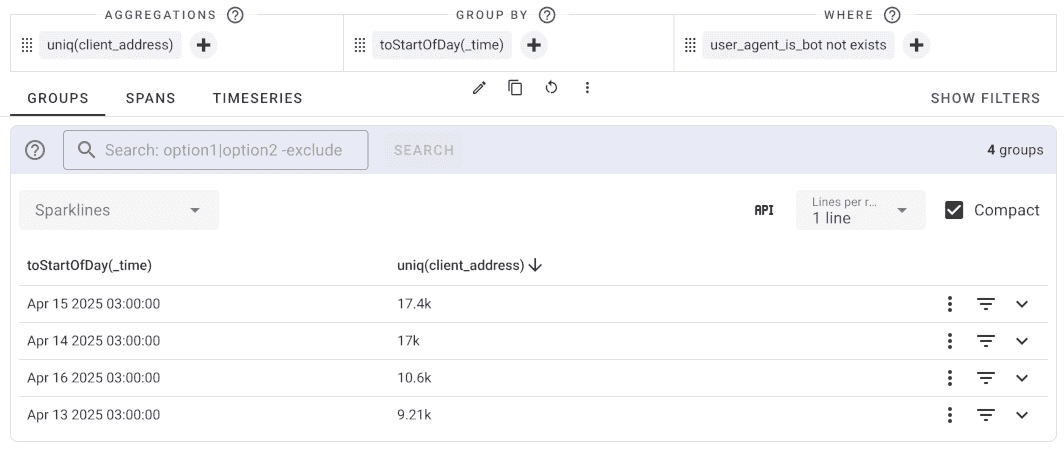
Daily Unique Visitors (Excluding Bots)
where user_agent_is_bot not exists | uniq(client_address) | group by toStartOfDay(_time)
This query identifies unique visitors per day while excluding bot traffic.
Error Rate by Service
group by service_name | having count() > 100 | select service_name, _error_rate
This query calculates error rates for services with significant traffic (more than 100 requests).
Where Errors Come From
where _status_code = "error" | group by service_name, _name | count(), p50(_dur_ms)
This query groups only the failing spans by service and operation, so the pair producing most of the errors comes out on top.
Slowest Operations
group by _name | p99(_dur_ms) as p99_ms | having count() > 100
This query gives the 99th percentile duration of each operation and drops the rare ones, so a single slow span cannot top the list. Sort by p99_ms to bring the slowest operations up.
Request Volume Over Time
group by toStartOfHour(_time), service_name | count() as request_count
This query buckets spans by hour and service, which turns a group list into a time series you can chart.
Query Performance Optimization
If your queries are taking too long to complete, apply these optimization strategies to improve performance:
Narrow the Time Range
- Select shorter time periods when possible (e.g., "Last 1 hour" instead of "Last 24 hours")
- Consider the data volume when selecting time ranges
Use System Filters
- Select specific systems when analyzing particular types of requests
- Example: Select
httpserver:allsystem for HTTP request analysis - This reduces the data scope significantly
Add Group Filters
- Further narrow scope with
_group_idfilters - Example:
where _group_id = 123456789 - Group filters are highly efficient for targeted analysis
Leverage Indexed Attributes
- Use OpenTelemetry semantic conventions for attribute names
- Uptrace optimizes certain attributes better than others
- Indexed attributes provide faster query performance
Query Structure Best Practices
- Apply filters before grouping when possible to reduce data volume
- Use specific filters rather than broad pattern matching
- Limit the number of groups in
group byclauses - Consider using
havingclauses to filter aggregated results
See Also
- Span query language reference
- Searching spans and logs - For simpler search syntax
- OpenTelemetry Semantic Conventions - For optimized attribute naming
- Grouping Strategies - Advanced grouping techniques