

Forever free OpenTelemetry APM
Uptrace is a free, open source OpenTelemetry APM — an application performance monitoring backend that ingests traces, metrics, and logs collected by OpenTelemetry, stores them in ClickHouse, and correlates them in a single UI.
That last part is what makes an OpenTelemetry APM worth having. A latency spike on a chart leads to the trace behind it, and that trace leads to the log records emitted while it ran — one query path across all three signals, because they share the same resource and attribute model instead of living in three products.
And because the collection layer is an open standard rather than a proprietary agent, the backend stays a decision you can revisit. Uptrace is free in the way that matters: self-host it and there is no per-host, per-seat, or per-data-volume fee, and no feature gate on the number of services you monitor.
Get started in 5 minutes
Try it without installing anything — the live demo runs on real data and needs no login.
Or run it locally:
git clone https://github.com/uptrace/uptrace.git
cd uptrace/example/docker
docker compose up -d
Open http://localhost:14318 and log in with admin@uptrace.local / admin. The compose file brings up Uptrace, ClickHouse, PostgreSQL, Redis, and an OpenTelemetry Collector. Full walkthrough: Docker deployment.
Then point your application at it. Uptrace accepts OTLP directly, so any OpenTelemetry SDK works with two environment variables:
export OTEL_EXPORTER_OTLP_ENDPOINT=http://localhost:4317
export OTEL_SERVICE_NAME=my-service
For production deployments see Kubernetes, Ansible, and scaling.
What you get
One UI for traces, metrics, and logs
All three signals land in one store under one attribute model, so correlation is a click rather than a copy-pasted trace ID. From a slow span you reach the logs it emitted; from a dashboard anomaly you reach the traces underneath it.
- Querying spans and grouping — find the slow or failing operations, not just individual requests
- Querying metrics with UQL, and dashboards
- Search across logs and spans
- Service graph — dependencies derived from real traffic
Alerting that lives in version control
Monitors are defined in YAML alongside the rest of your infrastructure config:
- Metric monitors evaluate a UQL expression over a rolling window — error rates, latency percentiles, CPU, disk
- Error monitors fire the first time a new error pattern appears in your logs
Notifications route to Slack, PagerDuty, Teams, Telegram, email, and webhooks. See alerting and observability as code.
Cost that does not scale with your headcount
OpenTelemetry itself is free: the SDKs, instrumentation libraries, and the Collector are all Apache 2.0, with no paid tier and no commercial edition. What normally costs money is the backend that stores and queries the data — and with Uptrace self-hosted, that part is free too.
- Self-hosted and free — no license, no per-host or per-seat pricing, no data cap
- ClickHouse storage — ZSTD compression brings a 1KB span under 40 bytes
- ~10,000 spans/sec per CPU core on ingest
- S3 tiering — archive cold data to object storage while recent data stays on fast disks
- Per-signal retention — logs and traces do not have to be kept for the same period
A real OpenTelemetry APM, not an OTel-compatible add-on
Plenty of tools accept OTLP through a translation layer bolted onto a proprietary data model, and attributes get flattened or dropped on the way in. Uptrace was built around OTLP and semantic conventions from the start — spans, metrics, and log records are stored in the shape OpenTelemetry defines, which is why correlation and out-of-the-box dashboards work without attribute mapping.
- OTLP/gRPC on 4317 and OTLP/HTTP on 4318
- Prometheus, Jaeger, and Zipkin formats for systems not yet on OTLP
- Grafana data source if you want to keep existing dashboards
- MCP server for querying your telemetry from AI agents
- Sentry SDK support for error reporting, including source maps
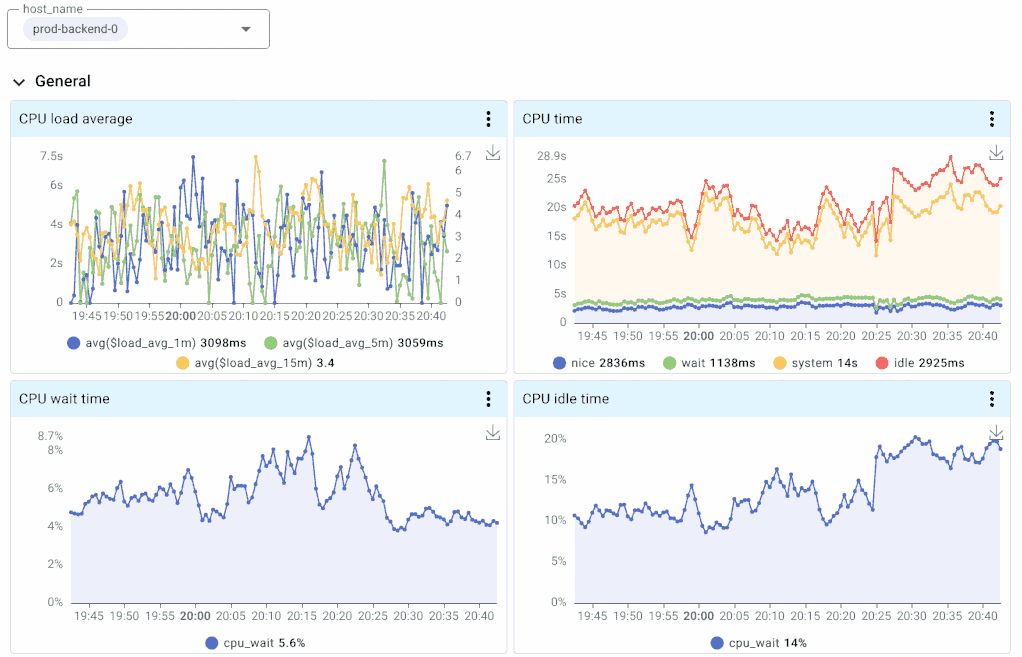
Uptrace allows to monitor your whole application stack on a compact and informative dashboard. You get a quick overview for all your services, hosts, and systems.

You can also analyze application performance with a fast and intuitive query language. You have the full power of SQL at your disposal to get deep insights from your data.
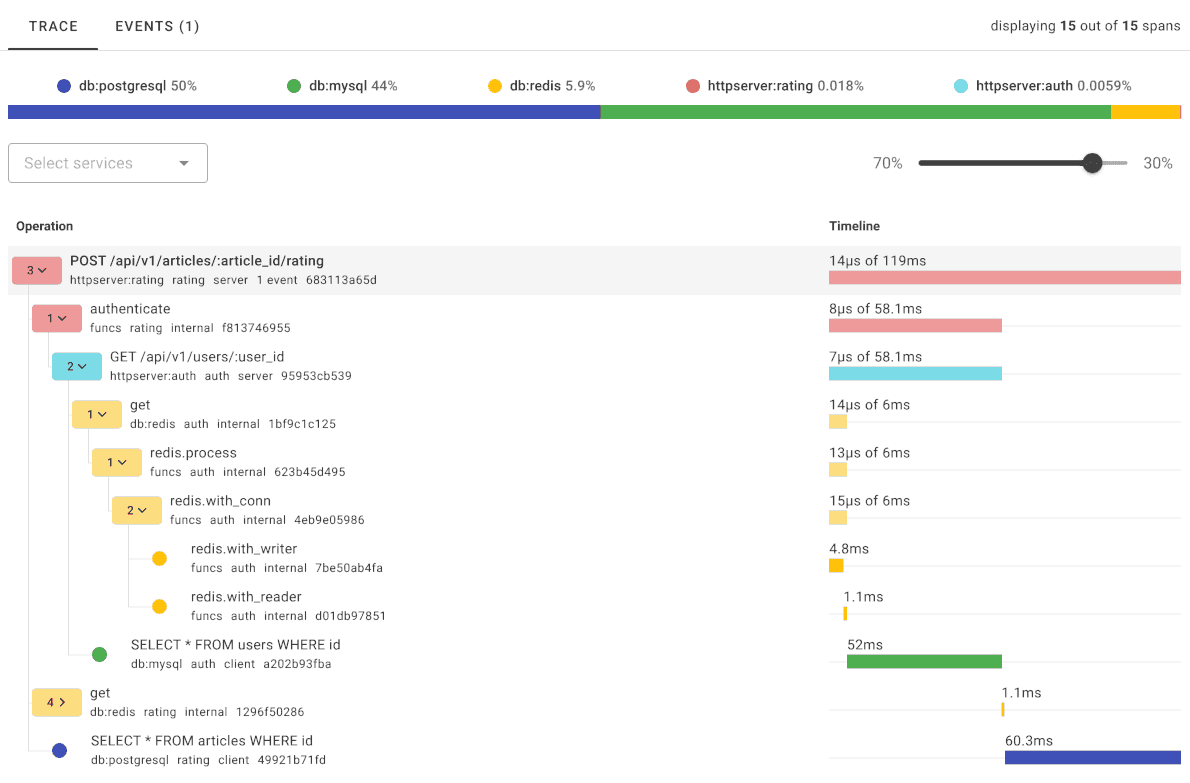
Fill the gaps left by tracing with modern metrics. Uptrace comes with pre-built dashboards for popular instrumentations and the ability to use Promql-like expressions to visualize metrics.
Uptrace vs traditional APM
Every APM answers the same three questions: is the application working, is it fast, and why is it slow. The difference is what you give up to get the answers. A traditional APM collects them through an agent it owns, so the data arrives in a shape only that vendor reads. An OpenTelemetry APM answers them from telemetry you collected yourself, in a format any backend understands.
| Uptrace | Datadog, New Relic, Dynatrace | |
|---|---|---|
| Instrumentation | Plain OpenTelemetry — works with any backend | Proprietary agents |
| Switching cost | Change one endpoint | Re-instrument every service |
| Self-hosting | Supported, and free | Rarely available |
| Pricing | Free self-hosted; usage-based cloud | Per-host, per-seat, or per-GB |
| Source code | On GitHub, Apache 2.0 | Closed |
| Data export | Raw telemetry, re-exportable | Vendor API only |
For a wider survey of OpenTelemetry APM options, see top OpenTelemetry backends and APM tools compared.
How Uptrace works
Senders and clients
- OpenTelemetry SDKOTLP
- OpenTelemetry collectorOTLP
- Sentry SDKHTTP
- Uptrace UIREST API
Uptrace backend
- Ingestion, storage routing, and monitors
Storage and delivery
- ClickHousetraces, metrics, logs
- PostgreSQLmetadata, users, projects
- AlertManagernotification routing
SDKs can export to Uptrace directly, or through an OpenTelemetry Collector if you want processing, redaction, or routing to be configuration rather than a redeploy. ClickHouse stores traces, metrics, and logs; PostgreSQL holds metadata, users, projects, and monitor definitions. See installation and configuration.
OpenTelemetry documentation
Setting up the pipeline that feeds an OpenTelemetry APM:
| What you need | Page |
|---|---|
| Instrument an application in your language | Get started |
| Instrument a specific framework or library | Integration guides |
| Collect from infrastructure or existing agents | Data ingestion |
| Understand how SDK, Collector, and OTLP fit together | Architecture |
| Run a Collector in front of the backend | OpenTelemetry Collector |
| Route data to one or more backends | Collector exporters |
| Configure the SDK | Environment variables |
| Keep traces connected across services | Context propagation |
| Control telemetry volume and cost | Sampling |
| Deploy in Kubernetes | OpenTelemetry Operator |
| Fix "no data is arriving" | Troubleshooting |
Background on the signals themselves: distributed tracing, metrics, logs, and profiles.
Need help? Join the community on Telegram or start a discussion on GitHub.
What's next?
- Install Uptrace — self-hosted, free, open source
- Instrument your application — SDK setup for Go, Python, Java, JavaScript, .NET, and more
- Live demo — no login required
- OpenTelemetry demo app — the official microservice demo wired to Uptrace