

OpenTelemetry Go distro for Uptrace

This document explains how to configure the OpenTelemetry Go SDK to export spans (traces), logs, and metrics to Uptrace using OTLP/gRPC.

To learn about OpenTelemetry APIs, see OpenTelemetry Go Tracing API and OpenTelemetry Go Metrics API.

Overview

OpenTelemetry provides observability for your Go applications by collecting telemetry data (traces, metrics, and logs) and exporting it to monitoring systems like Uptrace.

Installation Options

uptrace-go is a thin wrapper over opentelemetry-go that configures the OpenTelemetry SDK to export data to Uptrace. It does not add any new functionality and is provided only for your convenience.

Installation:

shell
go get github.com/uptrace/uptrace-go

Option 2: Direct OTLP Exporter

Use the OTLP exporter directly if you prefer more control over the configuration or are already using OpenTelemetry exporters. See the Direct OTLP Configuration section below.

Quick Start Guide

Follow these steps to get your first trace running in 5 minutes:

Step 1: Create an Uptrace Project

Create an Uptrace project to obtain a DSN (Data Source Name), for example, https://<secret>@api.uptrace.dev?grpc=4317.

Step 2: Install uptrace-go

shell
go get github.com/uptrace/uptrace-go

Step 3: Basic Configuration

You can configure the Uptrace client using a DSN (Data Source Name) from the project settings page. Replace <FIXME> with your actual Uptrace DSN, and myservice with a name that identifies your application.

go
import "github.com/uptrace/uptrace-go/uptrace"

uptrace.ConfigureOpentelemetry(
    // copy your project DSN here or use UPTRACE_DSN env var
    //uptrace.WithDSN("<FIXME>"),

    uptrace.WithServiceName("myservice"),
    uptrace.WithServiceVersion("v1.0.0"),
    uptrace.WithDeploymentEnvironment("production"),
)

Step 4: Create Your First Trace

Copy the code to main.go:

go
package main

import (
    "context"
    "errors"
    "fmt"

    "go.opentelemetry.io/otel"
    "go.opentelemetry.io/otel/attribute"
    "go.opentelemetry.io/otel/codes"
    "go.opentelemetry.io/otel/trace"

    "github.com/uptrace/uptrace-go/uptrace"
)

func main() {
    ctx := context.Background()

    // Configure OpenTelemetry with sensible defaults.
    uptrace.ConfigureOpentelemetry(
        // copy your project DSN here or use UPTRACE_DSN env var
        // uptrace.WithDSN("<FIXME>"),

        uptrace.WithServiceName("myservice"),
        uptrace.WithServiceVersion("1.0.0"),
    )
    // Send buffered spans and free resources.
    defer uptrace.Shutdown(ctx)

    // Create a tracer. Usually, tracer is a global variable.
    tracer := otel.Tracer("app_or_package_name")

    // Create a root span (a trace) to measure some operation.
    ctx, main := tracer.Start(ctx, "main-operation")
    // End the span when the operation we are measuring is done.
    defer main.End()

    // The passed ctx carries the parent span (main).
    // That is how OpenTelemetry manages span relations.
    _, child1 := tracer.Start(ctx, "GET /posts/:id")
    child1.SetAttributes(
        attribute.String("http.method", "GET"),
        attribute.String("http.route", "/posts/:id"),
        attribute.String("http.url", "http://localhost:8080/posts/123"),
        attribute.Int("http.status_code", 200),
    )
    if err := errors.New("dummy error"); err != nil {
        child1.RecordError(err, trace.WithStackTrace(true))
        child1.SetStatus(codes.Error, err.Error())
    }
    child1.End()

    _, child2 := tracer.Start(ctx, "SELECT")
    child2.SetAttributes(
        attribute.String("db.system", "mysql"),
        attribute.String("db.statement", "SELECT * FROM posts LIMIT 100"),
    )
    child2.End()

    fmt.Printf("trace: %s\n", uptrace.TraceURL(main))
}

Step 5: Run Your Application

Run the code, replacing <FIXME> with your Uptrace DSN:

shell
$ UPTRACE_DSN="<FIXME>" go run main.go
trace: https://app.uptrace.dev/traces/<trace_id>

Step 6: View Your Trace

Follow the link to view the trace:
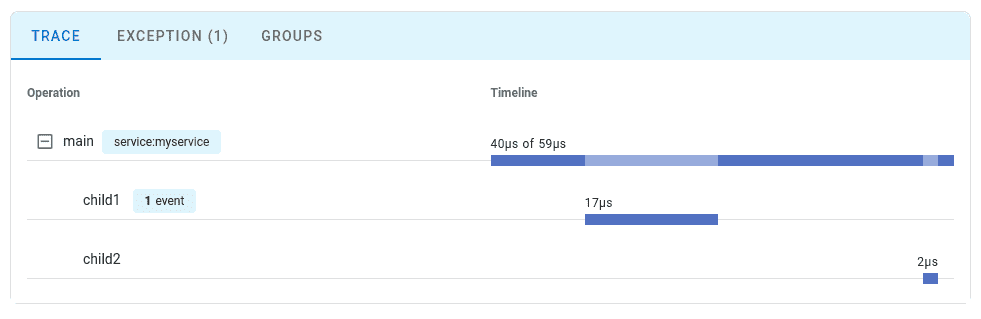
Basic trace

Configuration Options

You can find the full list of available options at pkg.go.dev.

OptionDescription
WithDSNA data source that specifies Uptrace project credentials. For example, https://<secret>@api.uptrace.dev?grpc=4317.
WithServiceNameservice.name resource attribute. For example, myservice.
WithServiceVersionservice.version resource attribute. For example, 1.0.0.
WithDeploymentEnvironmentdeployment.environment resource attribute. For example, production.
WithResourceAttributesAny other resource attributes.
WithResourceDetectorsConfigures additional resource detectors, for example, EC2 detector or GCE detector.
WithResourceResource contains attributes representing an entity that produces telemetry. Resource attributes are copied to all spans and events.

Direct OTLP Configuration

If you prefer to use the OTLP exporter directly or are already using OpenTelemetry exporters, you can configure OpenTelemetry manually without the uptrace-go wrapper.

Uptrace fully supports the OpenTelemetry Protocol (OTLP) over both gRPC and HTTP transports.
If you already have an OTLP exporter configured, you can continue using it with Uptrace by simply pointing it to the Uptrace OTLP endpoint.

Connecting to Uptrace

Choose an OTLP endpoint from the table below and pass your DSN via the uptrace-dsn header for authentication:

TransportEndpointPort
gRPChttps://api.uptrace.dev:43174317
HTTPhttps://api.uptrace.dev443

When using HTTP transport, you often need to specify the full URL for each signal type:

  • https://api.uptrace.dev/v1/traces
  • https://api.uptrace.dev/v1/logs
  • https://api.uptrace.dev/v1/metrics

Note: Most OpenTelemetry SDKs support both transports. Use HTTP unless you're already familiar with gRPC.

For performance and reliability, we recommend:

  • Use BatchSpanProcessor and BatchLogProcessor for batching spans and logs, reducing the number of export requests.
  • Enable gzip compression to reduce bandwidth usage.
  • Prefer delta metrics temporality (Uptrace converts cumulative metrics automatically).
  • Use Protobuf encoding instead of JSON (Protobuf is more efficient and widely supported).
  • Use HTTP transport for simplicity and fewer configuration issues (unless you're already familiar with gRPC).
  • Optionally, use the AWS X-Ray ID generator to produce trace IDs compatible with AWS X-Ray.

Common Environment Variables

You can use environment variables to configure resource attributes and propagators::

VariableDescription
OTEL_RESOURCE_ATTRIBUTESComma-separated resource attributes, e.g., service.name=myservice,service.version=1.0.0.
OTEL_SERVICE_NAME=myserviceSets the service.name attribute (overrides OTEL_RESOURCE_ATTRIBUTES).
OTEL_PROPAGATORSComma-separated list of context propagators (default: tracecontext,baggage).

Most language SDKs allow configuring the OTLP exporter entirely via environment variables:

shell
# Endpoint (choose HTTP or gRPC)
export OTEL_EXPORTER_OTLP_ENDPOINT="https://api.uptrace.dev"         # HTTP
#export OTEL_EXPORTER_OTLP_ENDPOINT="https://api.uptrace.dev:4317"   # gRPC

# Pass DSN for authentication
export OTEL_EXPORTER_OTLP_HEADERS="uptrace-dsn=<FIXME>"

# Performance optimizations
export OTEL_EXPORTER_OTLP_COMPRESSION=gzip
export OTEL_EXPORTER_OTLP_METRICS_DEFAULT_HISTOGRAM_AGGREGATION=BASE2_EXPONENTIAL_BUCKET_HISTOGRAM
export OTEL_EXPORTER_OTLP_METRICS_TEMPORALITY_PREFERENCE=DELTA

Configure BatchSpanProcessor to balance throughput and payload size:

shell
export OTEL_BSP_EXPORT_TIMEOUT=10000         # Max export timeout (ms)
export OTEL_BSP_MAX_EXPORT_BATCH_SIZE=10000  # Avoid >32MB payloads
export OTEL_BSP_MAX_QUEUE_SIZE=30000         # Adjust for available memory
export OTEL_BSP_MAX_CONCURRENT_EXPORTS=2     # Parallel exports

Exporting Traces (Direct OTLP)

Here is how you can export traces to Uptrace using the direct OTLP approach:

go
package main

import (
    "context"
    "fmt"
    "os"

    "go.opentelemetry.io/contrib/propagators/aws/xray"
    "go.opentelemetry.io/otel"
    "go.opentelemetry.io/otel/attribute"
    "go.opentelemetry.io/otel/exporters/otlp/otlptrace/otlptracehttp"
    "go.opentelemetry.io/otel/sdk/resource"
    sdktrace "go.opentelemetry.io/otel/sdk/trace"
)

func main() {
    ctx := context.Background()

    dsn := os.Getenv("UPTRACE_DSN")
    if dsn == "" {
        panic("UPTRACE_DSN environment variable is required")
    }
    fmt.Println("using DSN:", dsn)

    exporter, err := otlptracehttp.New(
        ctx,
        otlptracehttp.WithEndpoint("https://api.uptrace.dev"),
        otlptracehttp.WithHeaders(map[string]string{
            // Set the Uptrace DSN here or use UPTRACE_DSN env var.
            "uptrace-dsn": dsn,
        }),
        otlptracehttp.WithCompression(otlptracehttp.GzipCompression),
    )
    if err != nil {
        panic(err)
    }

    bsp := sdktrace.NewBatchSpanProcessor(exporter,
        sdktrace.WithMaxQueueSize(10_000),
        sdktrace.WithMaxExportBatchSize(10_000))
    // Call shutdown to flush the buffers when program exits.
    defer bsp.Shutdown(ctx)

    resource, err := resource.New(ctx,
        resource.WithFromEnv(),
        resource.WithTelemetrySDK(),
        resource.WithHost(),
        resource.WithAttributes(
            attribute.String("service.name", "myservice"),
            attribute.String("service.version", "1.0.0"),
        ))
    if err != nil {
        panic(err)
    }

    tracerProvider := sdktrace.NewTracerProvider(
        sdktrace.WithResource(resource),
        sdktrace.WithIDGenerator(xray.NewIDGenerator()),
    )
    tracerProvider.RegisterSpanProcessor(bsp)

    // Install our tracer provider and we are done.
    otel.SetTracerProvider(tracerProvider)

    tracer := otel.Tracer("app_or_package_name")
    ctx, span := tracer.Start(ctx, "main")
    defer span.End()

    fmt.Printf("trace: https://app.uptrace.dev/traces/%s\n", span.SpanContext().TraceID())
}

Exporting Metrics (Direct OTLP)

Here is how you can export metrics to Uptrace using the direct OTLP approach:

go
package main

import (
    "context"
    "fmt"
    "os"
    "time"

    "go.opentelemetry.io/otel"
    "go.opentelemetry.io/otel/attribute"
    "go.opentelemetry.io/otel/exporters/otlp/otlpmetric/otlpmetricgrpc"
    "go.opentelemetry.io/otel/metric"
    sdkmetric "go.opentelemetry.io/otel/sdk/metric"
    "go.opentelemetry.io/otel/sdk/metric/metricdata"
    "go.opentelemetry.io/otel/sdk/resource"
    "google.golang.org/grpc/encoding/gzip"
)

func main() {
    ctx := context.Background()

    dsn := os.Getenv("UPTRACE_DSN")
    if dsn == "" {
        panic("UPTRACE_DSN environment variable is required")
    }
    fmt.Println("using DSN:", dsn)

    exporter, err := otlpmetricgrpc.New(ctx,
        otlpmetricgrpc.WithEndpoint("https://api.uptrace.dev:4317"),
        otlpmetricgrpc.WithHeaders(map[string]string{
            // Set the Uptrace DSN here or use UPTRACE_DSN env var.
            "uptrace-dsn": dsn,
        }),
        otlpmetricgrpc.WithCompressor(gzip.Name),
        otlpmetricgrpc.WithTemporalitySelector(preferDeltaTemporalitySelector),
    )
    if err != nil {
        panic(err)
    }

    reader := sdkmetric.NewPeriodicReader(
        exporter,
        sdkmetric.WithInterval(15*time.Second),
    )

    resource, err := resource.New(ctx,
        resource.WithFromEnv(),
        resource.WithTelemetrySDK(),
        resource.WithHost(),
        resource.WithAttributes(
            attribute.String("service.name", "myservice"),
            attribute.String("service.version", "1.0.0"),
        ))
    if err != nil {
        panic(err)
    }

    provider := sdkmetric.NewMeterProvider(
        sdkmetric.WithReader(reader),
        sdkmetric.WithResource(resource),
    )
    otel.SetMeterProvider(provider)

    meter := provider.Meter("app_or_package_name")
    counter, _ := meter.Int64Counter(
        "uptrace.demo.counter_name",
        metric.WithUnit("1"),
        metric.WithDescription("counter description"),
    )

    fmt.Println("exporting data to Uptrace...")
    for {
        counter.Add(ctx, 1)
        time.Sleep(time.Millisecond)
    }
}

func preferDeltaTemporalitySelector(kind sdkmetric.InstrumentKind) metricdata.Temporality {
    switch kind {
    case sdkmetric.InstrumentKindCounter,
        sdkmetric.InstrumentKindObservableCounter,
        sdkmetric.InstrumentKindHistogram:
        return metricdata.DeltaTemporality
    default:
        return metricdata.CumulativeTemporality
    }
}

Exporting Logs (Direct OTLP)

Here is how you can export logs to Uptrace using the direct OTLP approach:

go
package main

import (
    "context"
    "fmt"
    "log/slog"
    "os"
    "time"

    "go.opentelemetry.io/contrib/bridges/otelslog"
    "go.opentelemetry.io/contrib/propagators/aws/xray"
    "go.opentelemetry.io/otel"
    "go.opentelemetry.io/otel/attribute"
    "go.opentelemetry.io/otel/exporters/otlp/otlplog/otlploghttp"
    "go.opentelemetry.io/otel/exporters/otlp/otlptrace/otlptracehttp"
    "go.opentelemetry.io/otel/log/global"
    sdklog "go.opentelemetry.io/otel/sdk/log"
    "go.opentelemetry.io/otel/sdk/resource"
    sdktrace "go.opentelemetry.io/otel/sdk/trace"
    "go.opentelemetry.io/otel/trace"
)

func main() {
    ctx := context.Background()

    dsn := os.Getenv("UPTRACE_DSN")
    if dsn == "" {
        panic("UPTRACE_DSN environment variable is required")
    }
    fmt.Println("using DSN:", dsn)

    resource, err := resource.New(ctx,
        resource.WithFromEnv(),
        resource.WithTelemetrySDK(),
        resource.WithHost(),
        resource.WithAttributes(
            attribute.String("service.name", "myservice"),
            attribute.String("service.version", "1.0.0"),
        ))
    if err != nil {
        panic(err)
    }

    shutdownTracing := configureTracing(ctx, dsn, resource)
    defer shutdownTracing()

    shutdownLogging := configureLogging(ctx, dsn, resource)
    defer shutdownLogging()

    tracer := otel.Tracer("app_or_package_name")
    logger := otelslog.NewLogger("app_or_package_name")

    ctx, main := tracer.Start(ctx, "main-operation", trace.WithSpanKind(trace.SpanKindServer))
    defer main.End()

    logger.ErrorContext(ctx, "hello world", slog.String("error", "error message"))

    fmt.Printf("trace: https://app.uptrace.dev/traces/%s\n", main.SpanContext().TraceID())
}

func configureLogging(ctx context.Context, dsn string, resource *resource.Resource) func() {
    exp, err := otlploghttp.New(ctx,
        otlploghttp.WithEndpoint("https://api.uptrace.dev"),
        otlploghttp.WithHeaders(map[string]string{
            "uptrace-dsn": dsn,
        }),
        otlploghttp.WithCompression(otlploghttp.GzipCompression),
    )
    if err != nil {
        panic(err)
    }

    bsp := sdklog.NewBatchProcessor(exp,
        sdklog.WithMaxQueueSize(10_000),
        sdklog.WithExportMaxBatchSize(10_000),
        sdklog.WithExportInterval(10*time.Second),
        sdklog.WithExportTimeout(10*time.Second),
    )

    provider := sdklog.NewLoggerProvider(
        sdklog.WithProcessor(bsp),
        sdklog.WithResource(resource),
    )

    global.SetLoggerProvider(provider)

    return func() {
        provider.Shutdown(ctx)
    }
}

func configureTracing(ctx context.Context, dsn string, resource *resource.Resource) func() {
    exporter, err := otlptracehttp.New(
        ctx,
        otlptracehttp.WithEndpoint("https://api.uptrace.dev"),
        otlptracehttp.WithHeaders(map[string]string{
            "uptrace-dsn": dsn,
        }),
        otlptracehttp.WithCompression(otlptracehttp.GzipCompression),
    )
    if err != nil {
        panic(err)
    }

    bsp := sdktrace.NewBatchSpanProcessor(exporter,
        sdktrace.WithMaxQueueSize(10_000),
        sdktrace.WithMaxExportBatchSize(10_000),
    )

    tracerProvider := sdktrace.NewTracerProvider(
        sdktrace.WithResource(resource),
        sdktrace.WithIDGenerator(xray.NewIDGenerator()),
    )
    tracerProvider.RegisterSpanProcessor(bsp)

    otel.SetTracerProvider(tracerProvider)

    return func() {
        tracerProvider.Shutdown(ctx)
    }
}

Serverless

AWS Lambda

See OpenTelemetry Go Lambda.

Vercel

On Vercel, you need to configure OpenTelemetry in the init function and force flush spans when the Vercel handler exits.

go
package handler

import (
    "fmt"
    "net/http"

    "go.opentelemetry.io/otel"
    "github.com/uptrace/uptrace-go/uptrace"
)

var tracer = otel.Tracer("app_or_package_name")

func init() {
    uptrace.ConfigureOpentelemetry(...)
}

func Handler(w http.ResponseWriter, req *http.Request) {
    ctx := req.Context()

    // Flush buffered spans.
    defer uptrace.ForceFlush(ctx)

    ctx, span := tracer.Start(ctx, "handler-name")
    defer span.End()

    fmt.Fprintf(w, "<h1>Hello from Go!</h1>")
}

Sampling

You can reduce the number of created (sampled) spans by configuring head-based sampling:

go
import "go.opentelemetry.io/contrib/samplers/probability/consistent"

sampler := consistent.ParentProbabilityBased(
    consistent.ProbabilityBased(0.5), // sample 50% of traces
)

uptrace.ConfigureOpentelemetry(
    uptrace.WithTraceSampler(sampler),

    // Other options
)

By default, uptrace-go samples all spans.

Error Monitoring

To monitor errors with a stack trace, use the RecordError API:

go
import (
    "go.opentelemetry.io/otel/codes"
    "go.opentelemetry.io/otel/trace"
)

ctx, span := tracer.Start(ctx, "operation-name")
defer span.End()

span.RecordError(err, trace.WithStackTrace(true))
span.SetStatus(codes.Error, err.Error())

See OpenTelemetry Go Tracing API for details.

Log Monitoring

To monitor logs, use OpenTelemetry instrumentations for popular logging libraries:

If that is not possible, see Monitoring Logs for more options such as Vector or FluentBit.

SDK Logging

By default, the OpenTelemetry Go SDK logs error messages to stderr. You can discard or redirect those logs by providing an error handler:

go
import "go.opentelemetry.io/otel"

otel.SetErrorHandler(otel.ErrorHandlerFunc(func(err error) {
    // ignore the error
}))

Baggage

You can use the baggagecopy package to read key/value pairs stored in baggage from the starting span's parent context and add them as attributes to the span.

go
import "go.opentelemetry.io/contrib/processors/baggagecopy"

uptrace.ConfigureOpentelemetry(
    uptrace.WithSpanProcessor(
        baggagecopy.NewSpanProcessor(nil),
    ),
)

What's Next?

Next, instrument more operations to get a more detailed picture. Try to prioritize network calls, disk operations, database queries, errors, and logs.

You can also create your own instrumentations using the OpenTelemetry Go Tracing API.