

OpenTelemetry PHP distro for Uptrace
Uptrace is an open-source, OpenTelemetry-native APM platform. This document explains how to configure the OpenTelemetry PHP SDK to export spans (traces), logs, and metrics to Uptrace using OTLP/HTTP.
Choose Your Setup Path
Option A: Quick Start with uptrace-php
Best for: Getting started quickly, automatic configuration
uptrace-php is a thin wrapper over opentelemetry-php that configures the OpenTelemetry SDK to export data to Uptrace. It does not add any new functionality and is provided only for your convenience.
Option B: Direct OTLP Configuration
Best for: Existing OpenTelemetry users, custom exporters, fine-grained control
Quick Start Guide
Follow these steps to get your first trace running in 5 minutes:
Step 1: Create an Uptrace Project
Create an Uptrace project (or self-host Uptrace) to obtain a DSN (Data Source Name), for example, https://<secret>@api.uptrace.dev?grpc=4317.
Step 2: Install uptrace-php
Prerequisites: Install Composer following the official installation guide.
composer require uptrace/uptrace
Step 3: Basic Configuration
You can configure the Uptrace client using a DSN (Data Source Name) from the project settings page. Replace <FIXME> with your actual Uptrace DSN, and myservice with a name that identifies your application.
<?php

declare(strict_types=1);
require __DIR__ . '/vendor/autoload.php';

use OpenTelemetry\API\Common\Instrumentation\Globals;

$uptrace = Uptrace\Distro::builder()
    // copy your project DSN here or use UPTRACE_DSN env var
    //->setDsn('<FIXME>')

    ->setServiceName('myservice')
    ->setServiceVersion('1.0.0')
    ->setResourceAttributes(['deployment.environment' => 'production'])
    ->buildAndRegisterGlobal();
Step 4: Create Your First Trace
Copy the code to main.php:
<?php

declare(strict_types=1);
require __DIR__ . '/vendor/autoload.php';

use OpenTelemetry\API\Common\Instrumentation\Globals;
use OpenTelemetry\API\Trace\SpanKind;
use OpenTelemetry\API\Trace\StatusCode;

// Configure OpenTelemetry with sensible defaults.
$uptrace = Uptrace\Distro::builder()
    // copy your project DSN here or use UPTRACE_DSN env var
    // ->setDsn('<FIXME>')

    ->setServiceName('myservice')
    ->setServiceVersion('1.0.0')
    ->buildAndRegisterGlobal();

// Create a tracer. Usually, tracer is a global variable.
$tracer = Globals::tracerProvider()->getTracer('app_or_package_name');

// Create a root span (a trace) to measure some operation.
$main = $tracer->spanBuilder('main-operation')->startSpan();
// End the span when the operation we are measuring is done.
$mainScope = $main->activate();

// The activated scope carries the parent span (main).
// That is how OpenTelemetry manages span relations.
$child1 = $tracer->spanBuilder('GET /posts/:id')
    ->setSpanKind(SpanKind::KIND_SERVER)
    ->startSpan();
$child1Scope = $child1->activate();

$child1->setAttributes([
    'http.method' => 'GET',
    'http.route' => '/posts/:id',
    'http.url' => 'http://localhost:8080/posts/123',
    'http.status_code' => 200,
]);

$exc = new \Exception('dummy error');
$child1->recordException($exc);
$child1->setStatus(StatusCode::STATUS_ERROR, $exc->getMessage());

$child1Scope->detach();
$child1->end();

$child2 = $tracer->spanBuilder('SELECT')->startSpan();
$child2Scope = $child2->activate();

$child2->setAttributes([
    'db.system' => 'mysql',
    'db.statement' => 'SELECT * FROM posts LIMIT 100',
]);

$child2Scope->detach();
$child2->end();

$mainScope->detach();
$main->end();

echo "trace: " . $uptrace->traceUrl($main) . PHP_EOL;
Step 5: Run Your Application
Run the code, replacing <FIXME> with your Uptrace DSN:
UPTRACE_DSN="<FIXME>" php main.php
trace: https://app.uptrace.dev/traces/<trace_id>
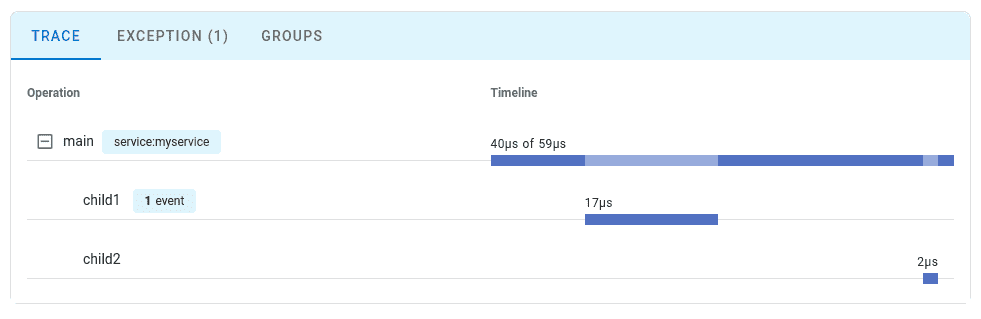
Step 6: View Your Trace
Follow the link to view the trace:
Configuration Options
| Option | Description |
|---|---|
setDsn | A data source that specifies Uptrace project credentials. For example, https://<secret>@api.uptrace.dev?grpc=4317. |
setServiceName | service.name resource attribute. For example, myservice. |
setServiceVersion | service.version resource attribute. For example, 1.0.0. |
setResourceAttributes | Any other resource attributes including deployment.environment. |
setSampling | Configures sampling to reduce costs in high-volume applications. |
setDebug | Enable debug mode for troubleshooting. |
What's Next?
Instrument more operations to get a detailed picture of your application. Prioritize network calls, database queries, errors, and logs.
By Use Case
| I want to... | Read this |
|---|---|
| Instrument without code changes | Zero-code instrumentation |
| Instrument my code with spans | Tracing API |
| Collect application metrics | Metrics API |
| Send logs to Uptrace | Logs integration |
| Enable distributed tracing | Context propagation |
| Reduce costs in production | Sampling strategies |
| Auto-detect cloud environment | Resource detectors |