

Querying Metrics
To learn about metrics, see OpenTelemetry Metrics documentation.
Uptrace provides a powerful query language that supports joining, grouping, and aggregating multiple metrics in a single query. The Uptrace query language is backwards compatible with Prometheus (PromQL), so you can use your existing PromQL queries with Uptrace.
If you're already familiar with PromQL, read the PromQL compatibility guide. For the complete list of functions, operators, and selectors, see the reference.
Writing queries
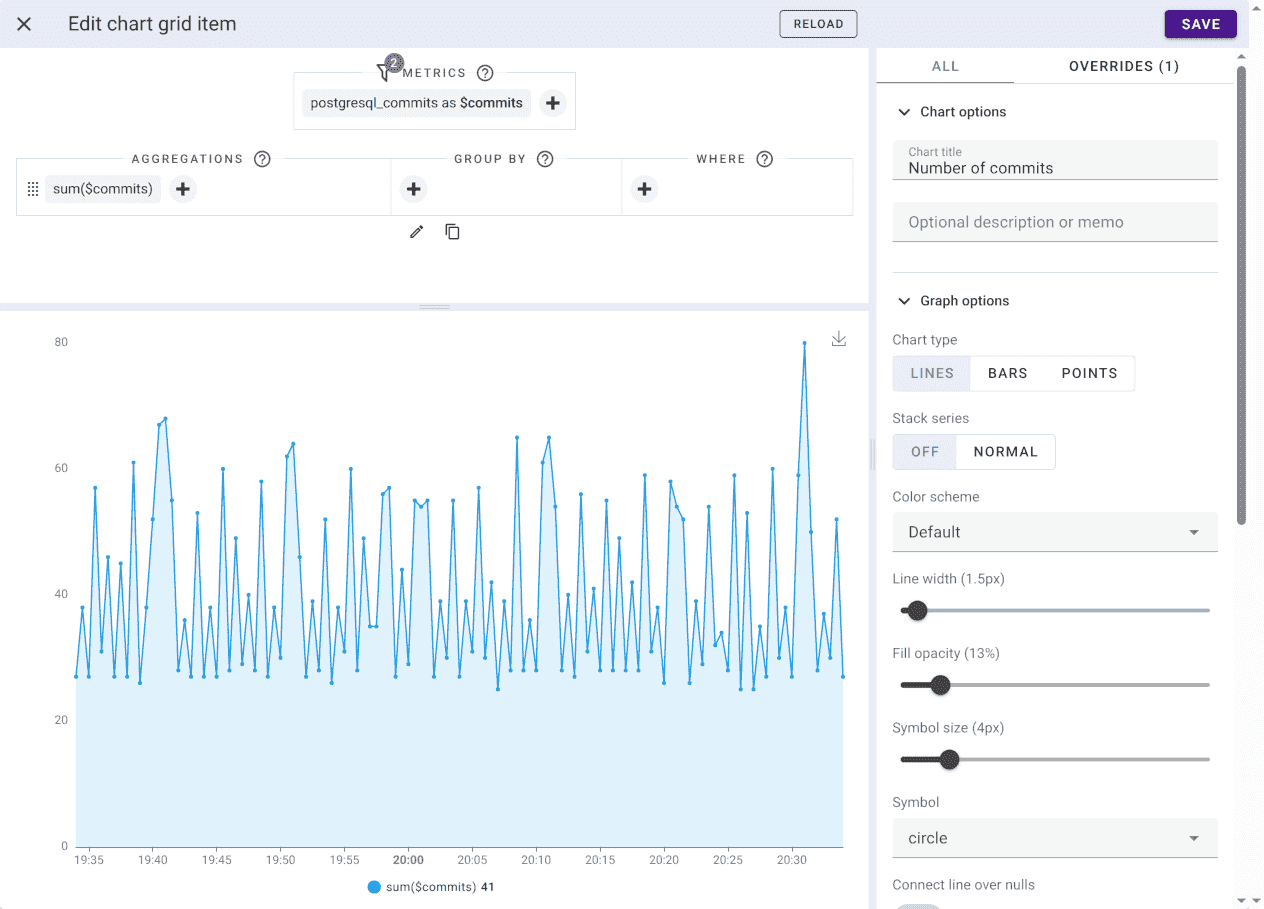
Uptrace allows you to create dashboards using UI or YAML configuration files. This documentation uses the more compact YAML format, but you can achieve the same with the UI.
YAML:
metrics:
  - postgresql_commits as $commits

query:
  - sum($commits)
UI:
Aliases
Because metric names can be quite long, Uptrace requires you to provide a short metric alias that must start with the dollar sign:
metrics:
  # metric aliases always start with the dollar sign
  - system_filesystem_usage as $fs_usage
  - system_network_packets as $packets
You must then use the alias instead of the metric name when writing queries:
query:
  - sum($fs_usage)
Uptrace also allows to specify an alias for expressions:
query:
  - $fs_usage{state="used"} as used_space
  - $fs_usage{host_name='host1', device='/dev/sdd1'} as host1_sdd1
You can then reference the expression by its alias in a later expression of the same query:
query:
  - $fs_usage{state="used"} as used
  - $fs_usage{state="free"} as free
  - used / (used + free) as used_ratio
The reference covers aliases that take part in a calculation without appearing in the result.
Filtering
Uptrace supports all the same filters just like PromQL:
node_cpu_seconds_total{cpu="0",mode="idle"}
node_cpu_seconds_total{cpu!="0",mode~"user|system"}
An inline filter binds to one selector. To filter every expression in a query at once, write a global where instead of repeating the same filter on each side:
$metric1 | $metric2 | where host = "myhost" | where service = "myservice"

# The same using inline filters.
$metric1{host="myhost",service="myservice"} | $metric2{host="myhost",service="myservice"}
A global where also accepts operators an inline filter does not, such as like and in. The reference lists what each form takes.
Grouping
Group on a function level:
sum($metric) by (attr1, attr2)
avg(sum($metric) by (attr1, attr2)) by (attr1)
For a whole expression:
sum($metric1) by (type) / sum($metric2) group by host_name

# The same.
sum($metric1) by (type, host_name) / sum($metric2) by (host_name)
Or for a whole query, affecting every expression in it:
$metric1 | metric2 | group by host_name

# The same using expression-wide grouping.
$metric1 group by host_name | $metric2 group by host_name
# Or custom grouping.
sum($metric1) by (host_name) | sum($metric2) by (host_name)
Manipulating attributes
Rename an attribute when two metrics carry the same thing under different names, so an expression can join them:
$metric1 by (deployment_environment as env, service_name as service)
$metric1 | group by deployment_environment as env, service_name as service
Rewrite a value when the raw one splits a group that should be a single one — a casing difference, a deployment prefix, an identifier buried inside a hostname:
group by trimPrefix(host_name, 'uptrace-prod-') as host
The reference lists every function that works on attribute values in a grouping expression.
Joining
Putting two metrics in one expression joins them by their matching attributes, which is how two raw metrics become a ratio or a difference:
$mem_free + $mem_cached group by host_name, service_name

# The same.
$mem_free by (host_name, service_name) + $mem_cached by (host_name, service_name)
The join matches on attribute names, so both sides have to agree on them. When they do not, rename one side with as to line it up. One-to-many and many-to-one joins need no extra syntax at all. See grouping and joining in the reference for both forms.
Supported functions
Uptrace groups its functions into aggregate, rollup, transform, and timeseries functions, plus the functions that manipulate attribute values in a grouping expression:
- Aggregate functions combine several timeseries at each timestamp, for example
sum,avg,p95, anduniq. Uptrace pushes an aggregation applied directly to a metric into ClickHouse. - Rollup functions read the datapoints of one timeseries inside a lookbehind window, for example
rate,increase, andmax_over_time. The number of timeseries stays the same. - Transform functions run on each datapoint, for example
perMin,abs, andclamp_max. - Timeseries functions rewrite the set of series or fill their gaps, for example
topk,sort, andkeep_last_value.
The reference lists every function with its signature, and states which aggregation each instrument accepts.
Operators
Uptrace supports arithmetic, comparison, and logical operators. The reference lists them with their precedence.
Conditional operators
if keeps a value only where another expression has one, ifnot is its inverse, and default fills the gaps that leaves. Together they make a ratio safe on a small sample: if drops the points where the denominator is too small to mean anything, and default decides what the chart shows instead of a gap.
sum($misses) / (sum($hits) + sum($misses))
  if (sum($hits) + sum($misses) >= 100)
  as hit_rate
Without a default, the points that fail the condition are absent and the chart breaks the line there. The reference gives all three forms.
Offset
offset shifts the query window, which lets you put a metric next to its own value from an earlier period — this week against last week, for example:
$http_requests_total offset 5m
A negative offset looks ahead of the evaluation time instead. See offset in the reference.
Instruments
OpenTelemetry offers several instruments, and Uptrace stores each one as its own kind of timeseries. The instrument decides which aggregations a metric accepts: a Counter only grows, so sum is meaningful and avg is not; a Histogram keeps buckets, so it answers percentiles.
| Instrument | Timeseries kind |
|---|---|
| Counter, CounterObserver | Counter |
| UpDownCounter, UpDownCounterObserver | Additive |
| GaugeObserver | Gauge |
| Histogram | Histogram |
| AWS CloudWatch | Summary |
| Prometheus remote write, Prometheus receiver | PromCounter |
For the full instrument and aggregation matrix, and for what a bare selector such as $metric aggregates to on each instrument, see the reference.
What are timeseries?
A timeseries is a metric with an unique set of attributes, for example, each host has a separate timeseries for the same metric name:
# metric_name{ attr1, attr2... }
system_filesystem_usage{host_name='host1'} # timeseries 1
system_filesystem_usage{host_name='host2'} # timeseries 2
You can add more attributes to create more detailed and rich timeseries, for example, you can use state attribute to report the number of free and used bytes in a filesystem:
system_filesystem_usage{host_name='host1', state='free'} # timeseries 1
system_filesystem_usage{host_name='host1', state='used'} # timeseries 2

system_filesystem_usage{host_name='host2', state='free'} # timeseries 3
system_filesystem_usage{host_name='host2', state='used'} # timeseries 4
With just 2 attributes, you can write a number of useful queries:
# the filesystem size (free+used bytes) on each host
query:
  - sum($fs_usage) group by host_name

# the number of free bytes on each host
query:
  - sum($fs_usage{state='free'}) as free group by host_name

# fs utilization on each host
query:
  - sum($fs_usage{state='used'}) / sum($fs_usage) as fs_util group by host_name

# the size of your dataset on all hosts
query:
  - sum($fs_usage{state='used'}) as dataset_size