

OpenTelemetry Rust distro for Uptrace
Uptrace is an open-source, OpenTelemetry-native APM platform. This document explains how to configure the OpenTelemetry Rust SDK to export spans (traces), logs, and metrics to Uptrace using OTLP.
Choose Your Setup Path
Option A: Quick Start with the uptrace crate
Best for: Getting started quickly, automatic configuration
uptrace is a thin wrapper over opentelemetry-rust that configures the OpenTelemetry SDK to export traces, metrics, and logs to Uptrace. It does not add any new functionality and is provided only for your convenience.
Option B: Direct OTLP Configuration
Best for: Existing OpenTelemetry users, custom exporters, fine-grained control
Quick Start Guide
Follow these steps to get your first trace running in 5 minutes:
Step 1: Create an Uptrace Project
Create an Uptrace project (or self-host Uptrace) to obtain a DSN (Data Source Name), for example, https://<secret>@api.uptrace.dev?grpc=4317.
Step 2: Install the uptrace crate
cargo add uptrace opentelemetry
Or add the dependencies to your Cargo.toml manually:
[dependencies]
uptrace = "0.33"
opentelemetry = "0.33"
The uptrace crate version follows the OpenTelemetry Rust version it is built with. Keep opentelemetry on the same version, or use the re-exported uptrace::opentelemetry and uptrace::opentelemetry_sdk crates.
Step 3: Basic Configuration
You can configure the Uptrace client using a DSN (Data Source Name) from the project settings page. Replace myservice with a name that identifies your application.
let uptrace = uptrace::Uptrace::builder()
    // copy your project DSN here or use UPTRACE_DSN env var
    //.with_dsn("<FIXME>")
    .with_service_name("myservice")
    .with_service_version("1.0.0")
    .with_deployment_environment("production")
    .build()?;
build() creates and registers the global tracer and meter providers, so you can use opentelemetry::global anywhere in your code. Call uptrace.shutdown() before the program exits to send buffered data.
Step 4: Create Your First Trace
Copy the code to src/main.rs:
use std::thread;
use std::time::Duration;

use opentelemetry::trace::{TraceContextExt, Tracer};
use opentelemetry::{global, KeyValue};

fn main() -> Result<(), Box<dyn std::error::Error>> {
    // Configure OpenTelemetry with sensible defaults.
    let uptrace = uptrace::Uptrace::builder()
        // copy your project DSN here or use UPTRACE_DSN env var
        //.with_dsn("<FIXME>")
        .with_service_name("myservice")
        .with_service_version("1.0.0")
        .build()?;

    // Create a tracer. Usually, tracer is a global variable.
    let tracer = global::tracer("app_or_crate_name");

    // Create a root span (a trace) to measure some operation.
    tracer.in_span("main-operation", |cx| {
        // Spans created inside the closure become children of main-operation.
        tracer.in_span("GET /posts/:id", |cx| {
            thread::sleep(Duration::from_millis(10));

            let span = cx.span();
            span.set_attribute(KeyValue::new("http.request.method", "GET"));
            span.set_attribute(KeyValue::new("http.route", "/posts/:id"));
            span.set_attribute(KeyValue::new("http.response.status_code", 200));

            // Record an error on the current span.
            uptrace.report_error(&std::io::Error::other("dummy error"));
        });

        tracer.in_span("SELECT", |cx| {
            thread::sleep(Duration::from_millis(20));

            let span = cx.span();
            span.set_attribute(KeyValue::new("db.system.name", "mysql"));
            span.set_attribute(KeyValue::new("db.query.text", "SELECT * FROM posts LIMIT 100"));
        });

        println!("trace: {}", uptrace.trace_url(cx.span().span_context()));
    });

    // Send buffered data and free resources.
    uptrace.shutdown()?;
    Ok(())
}
Step 5: Run Your Application
Run the code, replacing <FIXME> with your Uptrace DSN:
$ UPTRACE_DSN="<FIXME>" cargo run
trace: https://app.uptrace.dev/traces/<trace_id>?span_id=<span_id>
Step 6: View Your Trace
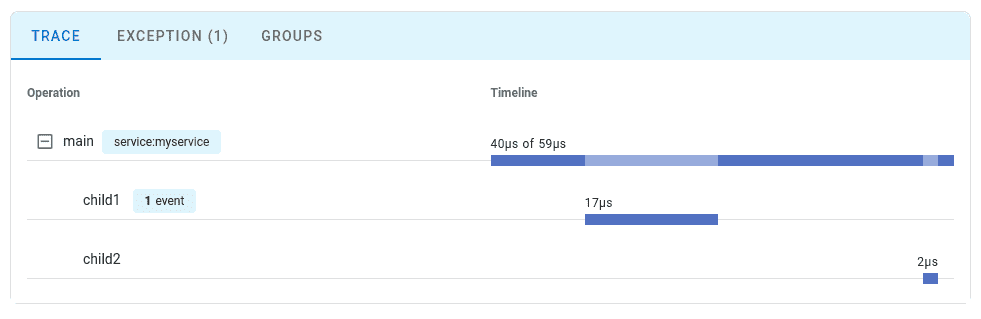
Follow the link to view the trace:
Configuration Options
You can find the full list of available options at docs.rs.
| Option | Description |
|---|---|
with_dsn | A data source that specifies Uptrace project credentials. For example, https://<secret>@api.uptrace.dev?grpc=4317. |
with_service_name | service.name resource attribute. For example, myservice. |
with_service_version | service.version resource attribute. For example, 1.0.0. |
with_deployment_environment | deployment.environment resource attribute. For example, production. |
with_resource_attributes | Any other resource attributes. |
with_resource_detector | Adds a resource detector, for example, for Kubernetes or containers. |
with_resource | Resource that replaces all detected and configured attributes. |
with_traces, with_metrics, with_logs | Configures each signal, for example, a sampler via TracesConfig::with_sampler. |
without_traces, without_metrics, without_logs | Disables a signal. |
with_protocol | Protocol::Http (default) or Protocol::Grpc. |
with_propagator | Global propagator. Defaults to W3C TraceContext + Baggage. |
with_panic_hook | Records panics as span exceptions. |
The Uptrace handle returned by build() provides trace_url, current_trace_url, report_error, force_flush, and shutdown.
Cargo features
| Feature | Description |
|---|---|
http (default) | Exports data using OTLP/HTTP (protobuf). Does not require an async runtime. |
grpc | Exports data using OTLP/gRPC (tonic). Requires a Tokio runtime. |
tracing | Integration with the tracing crate (spans and logs). |
internal-logs (default) | Reports internal diagnostics via tracing. |
For example, to export over gRPC only:
[dependencies]
uptrace = { version = "0.33", default-features = false, features = ["grpc"] }
Environment variables
| Environment Variable | Description |
|---|---|
UPTRACE_DSN | Uptrace DSN, used when with_dsn is not called |
UPTRACE_DISABLED | Disables Uptrace: build() returns a no-op handle |
OTEL_SERVICE_NAME | Service name (e.g., myservice) |
OTEL_RESOURCE_ATTRIBUTES | Additional resource attributes |
OTEL_TRACES_SAMPLER | Sampling strategy (e.g., parentbased_traceidratio) |
OTEL_TRACES_SAMPLER_ARG | Sampling argument (e.g., 0.1 for 10%) |
Uptrace fully supports the OpenTelemetry Protocol (OTLP) over both gRPC and HTTP transports.
If you already have an OTLP exporter configured, you can continue using it with Uptrace by simply pointing it to the Uptrace OTLP endpoint.
Connecting to Uptrace
Choose an OTLP endpoint from the table below and pass your DSN via the uptrace-dsn header for authentication:
| Transport | Endpoint | Port |
|---|---|---|
| gRPC | https://api.uptrace.dev:4317 | 4317 |
| HTTP | https://api.uptrace.dev | 443 |
When using HTTP transport, you often need to specify the full URL for each signal type:
https://api.uptrace.dev/v1/traceshttps://api.uptrace.dev/v1/logshttps://api.uptrace.dev/v1/metrics
Note: Most OpenTelemetry SDKs support both transports. Use HTTP unless you're already familiar with gRPC.
Recommended Settings
For performance and reliability, we recommend:
- Use
BatchSpanProcessorandBatchLogProcessorfor batching spans and logs, reducing the number of export requests. - Enable
gzipcompression to reduce bandwidth usage. - Prefer
deltametrics temporality (Uptrace converts cumulative metrics automatically). - Use Protobuf encoding instead of JSON (Protobuf is more efficient and widely supported).
- Use HTTP transport for simplicity and fewer configuration issues (unless you're already familiar with gRPC).
- Optionally, use the AWS X-Ray ID generator to produce trace IDs compatible with AWS X-Ray.
Common Environment Variables
You can use environment variables to configure resource attributes and propagators::
| Variable | Description |
|---|---|
OTEL_RESOURCE_ATTRIBUTES | Comma-separated resource attributes, e.g., service.name=myservice,service.version=1.0.0. |
OTEL_SERVICE_NAME=myservice | Sets the service.name attribute (overrides OTEL_RESOURCE_ATTRIBUTES). |
OTEL_PROPAGATORS | Comma-separated list of context propagators (default: tracecontext,baggage). |
Most language SDKs allow configuring the OTLP exporter entirely via environment variables:
# Endpoint (choose HTTP or gRPC)
export OTEL_EXPORTER_OTLP_ENDPOINT="https://api.uptrace.dev"         # HTTP
#export OTEL_EXPORTER_OTLP_ENDPOINT="https://api.uptrace.dev:4317"   # gRPC

# Pass DSN for authentication
export OTEL_EXPORTER_OTLP_HEADERS="uptrace-dsn=<FIXME>"

# Performance optimizations
export OTEL_EXPORTER_OTLP_COMPRESSION=gzip
export OTEL_EXPORTER_OTLP_METRICS_DEFAULT_HISTOGRAM_AGGREGATION=BASE2_EXPONENTIAL_BUCKET_HISTOGRAM
export OTEL_EXPORTER_OTLP_METRICS_TEMPORALITY_PREFERENCE=DELTA
Configure BatchSpanProcessor to balance throughput and payload size:
export OTEL_BSP_EXPORT_TIMEOUT=10000         # Max export timeout (ms)
export OTEL_BSP_MAX_EXPORT_BATCH_SIZE=10000  # Avoid >32MB payloads
export OTEL_BSP_MAX_QUEUE_SIZE=30000         # Adjust for available memory
export OTEL_BSP_MAX_CONCURRENT_EXPORTS=2     # Parallel exports
Troubleshooting
Common Issues
No data in Uptrace:
- Verify the DSN is set correctly, either via
.with_dsn("...")or theUPTRACE_DSNenvironment variable.build()returns an error for an empty or invalid DSN. - Check that the endpoint is reachable:
https://api.uptrace.dev:443(HTTP) orhttps://api.uptrace.dev:4317(gRPC). - Make sure you call
uptrace.shutdown()before the program exits — without it, buffered spans are dropped. - Check that
UPTRACE_DISABLEDis not set;uptrace.is_enabled()returnsfalsein that case.
Build errors with mismatched types:
- Errors such as "expected
opentelemetry::..., found a differentopentelemetry::..." mean two OpenTelemetry versions are in your dependency tree. Use the same0.33version for allopentelemetry*crates, or use the re-exporteduptrace::opentelemetry. Runcargo tree -d -i opentelemetryto find duplicates.
gRPC exporter panics or doesn't export:
- The
grpcfeature uses tonic, which requires a Tokio runtime. BuildUptraceinside#[tokio::main]and callshutdown()fromtokio::task::spawn_blocking.
Logs exported in an infinite loop:
- When using
uptrace.log_layer(), filter out the exporter's own logs withEnvFilterdirectives such ashyper=off,h2=off,tonic=off, andreqwest=off. See Logs.
What's Next?
Instrument more operations to get a detailed picture of your application. Prioritize network calls, database queries, errors, and logs.
By Use Case
| I want to... | Read this |
|---|---|
| Configure OTLP exporter directly | OTLP Configuration |
| Instrument my code with spans | Tracing API |
| Collect application metrics | Metrics API |
| Send logs to Uptrace | Logs integration |
| Enable distributed tracing | Context propagation |
| Reduce costs in production | Sampling strategies |
| Auto-detect cloud environment | Resource detectors |
Framework Guides
OpenTelemetry Rust integrates with popular frameworks through the tracing ecosystem:
| Framework | Integration |
|---|---|
| Axum | Built-in tracing support |
| Actix-web | tracing-actix-web crate |
| Warp | Built-in tracing support |
| Hyper | Built-in tracing support |
| Reqwest | tracing-opentelemetry crate |
| SQLx | Built-in tracing support |
| Tokio | tokio-tracing features |
See the OTLP Configuration page for Axum and Actix-web integration examples.