

Python Zero-Code Instrumentation with Uptrace

This guide explains how to automatically instrument Python applications without modifying code using the opentelemetry-instrument wrapper. The auto-instrumentation agent automatically detects and instruments popular Python frameworks and libraries, exporting telemetry data to Uptrace using OTLP.
Note: The examples below use Uptrace as the OTLP backend, but you can use any OpenTelemetry-compatible backend (Jaeger, Grafana Tempo, Prometheus, etc.) by changing the OTEL_EXPORTER_OTLP_ENDPOINT and removing Uptrace-specific headers.
What is Zero-Code Instrumentation?
Zero-code instrumentation (also called automatic instrumentation) allows you to collect telemetry data from Python applications without modifying application code. The OpenTelemetry Python agent uses monkey-patching to intercept function calls in popular libraries and frameworks at runtime, automatically generating distributed traces, metrics, and logs.
How it works:
- Install the
opentelemetry-distropackage containing the auto-instrumentation CLI - Run
opentelemetry-bootstrapto automatically detect and install instrumentation libraries - Use the
opentelemetry-instrumentwrapper to run your application - Telemetry data is automatically collected and exported to Uptrace
Prerequisites
Make sure your exporter is configured before you start instrumenting code. Follow Getting started with OpenTelemetry Python or set up Direct OTLP Configuration first.
Before starting, ensure you have:
- Python 3.8 or higher
- pip package manager
- An existing Python application (Flask, Django, FastAPI, etc.)
- An Uptrace account with a DSN
Quick Start Guide
Follow these steps to get your first auto-instrumented trace running in 5 minutes.
Step 1: Create an Uptrace Project
Create an Uptrace project to obtain a DSN (Data Source Name), for example, https://<secret>@api.uptrace.dev?grpc=4317.
Step 2: Install Auto-Instrumentation
Install the OpenTelemetry distribution and OTLP exporter:
pip install opentelemetry-distro opentelemetry-exporter-otlp
Step 3: Bootstrap Instrumentation
Run the bootstrap command to automatically install instrumentation libraries for your installed packages:
opentelemetry-bootstrap -a install
This command scans your Python environment and installs matching instrumentation packages. For example, if Flask is installed, it will add opentelemetry-instrumentation-flask automatically.
Tip: Run opentelemetry-bootstrap -a list to see which instrumentation packages will be installed without actually installing them.
Step 4: Configure Environment Variables
Configure the agent to export data to Uptrace. Replace <FIXME> with your actual Uptrace DSN, and myservice with a name that identifies your application:
export OTEL_SERVICE_NAME=myservice
export OTEL_SERVICE_VERSION=1.0.0
export OTEL_TRACES_EXPORTER=otlp
export OTEL_METRICS_EXPORTER=otlp
export OTEL_LOGS_EXPORTER=otlp
export OTEL_EXPORTER_OTLP_ENDPOINT=https://api.uptrace.dev:443
export OTEL_EXPORTER_OTLP_HEADERS=uptrace-dsn=<FIXME>
export OTEL_EXPORTER_OTLP_PROTOCOL=http/protobuf
Important: OpenTelemetry Python uses HTTP/Protobuf by default (port 4318). The Uptrace DSN typically specifies gRPC port 4317, so ensure you use the correct port for your protocol.
Step 5: Run Your Application
Use the opentelemetry-instrument wrapper to run your Python application:
opentelemetry-instrument python app.py
For framework-specific commands:
# Flask
opentelemetry-instrument flask run

# Django
opentelemetry-instrument python manage.py runserver

# Gunicorn
opentelemetry-instrument gunicorn app:app

# FastAPI with Uvicorn
opentelemetry-instrument uvicorn main:app
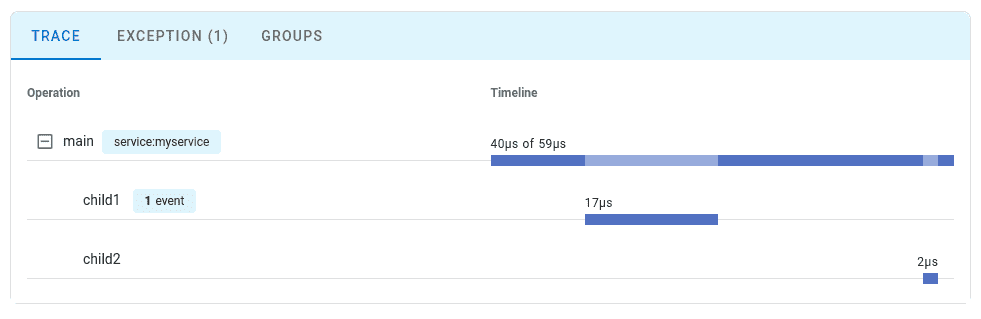
Step 6: View Your Trace
Navigate to the Uptrace UI to view your traces:
Auto-Instrumented Libraries
The opentelemetry-bootstrap command automatically instruments the following popular Python libraries:
Web Frameworks
- Flask - automatic request/response tracing
- Django - middleware, ORM, and template rendering
- FastAPI - async request handling and dependencies
- Pyramid - request/response lifecycle
- Falcon - API framework instrumentation
Database Clients
- psycopg2 (PostgreSQL) - SQL queries and connections
- pymysql, mysql-connector-python (MySQL) - database operations
- pymongo (MongoDB) - collection operations and queries
- SQLAlchemy - ORM and core engine
- Redis (redis-py) - commands and pipelines
HTTP Clients
- requests - synchronous HTTP requests
- urllib3 - low-level HTTP client
- httpx - modern async HTTP client
- aiohttp - async HTTP client/server
Task Queues
- Celery - task execution and worker processes
- RQ (Redis Queue) - job queuing
Other Libraries
- logging - automatic log correlation with traces
- asyncio - async context propagation
For the complete list of supported libraries, see the OpenTelemetry Registry.
Configuration Options
Environment Variables
Common configuration options for zero-code instrumentation:
# Service identification
export OTEL_SERVICE_NAME=my-python-app
export OTEL_SERVICE_VERSION=1.0.0
export OTEL_RESOURCE_ATTRIBUTES=deployment.environment=production,service.namespace=backend

# Exporter configuration
export OTEL_TRACES_EXPORTER=otlp
export OTEL_METRICS_EXPORTER=otlp
export OTEL_LOGS_EXPORTER=otlp
export OTEL_EXPORTER_OTLP_ENDPOINT=https://api.uptrace.dev:443
export OTEL_EXPORTER_OTLP_HEADERS=uptrace-dsn=<your_dsn>
export OTEL_EXPORTER_OTLP_PROTOCOL=http/protobuf

# Sampling configuration
export OTEL_TRACES_SAMPLER=parentbased_traceidratio
export OTEL_TRACES_SAMPLER_ARG=0.1  # Sample 10% of traces

# Propagators
export OTEL_PROPAGATORS=tracecontext,baggage

# Logging
export OTEL_PYTHON_LOG_LEVEL=info
For the full list of configuration options, see the OpenTelemetry Python Configuration documentation.
Disabling Specific Instrumentations
If you need to disable instrumentation for specific libraries:
# Disable all instrumentations except specific ones
export OTEL_PYTHON_DISABLED_INSTRUMENTATIONS=flask,django

# Or disable specific instrumentations
export OTEL_PYTHON_FLASK_EXCLUDED_URLS=/health,/metrics
Command-Line Arguments
You can also configure options via command-line arguments:
opentelemetry-instrument \
    --traces_exporter otlp \
    --metrics_exporter otlp \
    --service_name my-app \
    --exporter_otlp_endpoint https://api.uptrace.dev:443 \
    --exporter_otlp_headers uptrace-dsn=<your_dsn> \
    python app.py
Environment variables take precedence over command-line arguments.
Production Deployment
Docker Example
FROM python:3.11-slim

WORKDIR /app

# Copy application files
COPY requirements.txt .
RUN pip install -r requirements.txt

# Install OpenTelemetry auto-instrumentation
RUN pip install opentelemetry-distro opentelemetry-exporter-otlp
RUN opentelemetry-bootstrap -a install

COPY . .

# Configure OpenTelemetry
ENV OTEL_SERVICE_NAME=my-python-app
ENV OTEL_TRACES_EXPORTER=otlp
ENV OTEL_EXPORTER_OTLP_ENDPOINT=https://api.uptrace.dev:443
ENV OTEL_EXPORTER_OTLP_HEADERS=uptrace-dsn=<your_dsn>

# Run with auto-instrumentation
CMD ["opentelemetry-instrument", "python", "app.py"]
Docker Compose Example
version: '3.8'

services:
  web:
    build: .
    ports:
      - "5000:5000"
    environment:
      - OTEL_SERVICE_NAME=flask-app
      - OTEL_SERVICE_VERSION=1.0.0
      - OTEL_TRACES_EXPORTER=otlp
      - OTEL_METRICS_EXPORTER=otlp
      - OTEL_EXPORTER_OTLP_ENDPOINT=https://api.uptrace.dev:443
      - OTEL_EXPORTER_OTLP_HEADERS=uptrace-dsn=${UPTRACE_DSN}
    command: opentelemetry-instrument flask run --host=0.0.0.0
Systemd Service Example
[Unit]
Description=My Python Application
After=network.target

[Service]
Type=simple
User=www-data
WorkingDirectory=/opt/myapp
Environment="OTEL_SERVICE_NAME=my-python-app"
Environment="OTEL_TRACES_EXPORTER=otlp"
Environment="OTEL_EXPORTER_OTLP_ENDPOINT=https://api.uptrace.dev:443"
Environment="OTEL_EXPORTER_OTLP_HEADERS=uptrace-dsn=<your_dsn>"
ExecStart=/usr/bin/opentelemetry-instrument /usr/bin/python3 /opt/myapp/app.py
Restart=always

[Install]
WantedBy=multi-user.target
Kubernetes Deployment
For Kubernetes, use the OpenTelemetry Operator to inject auto-instrumentation automatically:
apiVersion: opentelemetry.io/v1alpha1
kind: Instrumentation
metadata:
  name: python-instrumentation
  namespace: default
spec:
  exporter:
    endpoint: https://api.uptrace.dev:443
  propagators:
    - tracecontext
    - baggage
  sampler:
    type: parentbased_traceidratio
    argument: "1.0"
  python:
    image: ghcr.io/open-telemetry/opentelemetry-operator/autoinstrumentation-python:latest
    env:
      - name: OTEL_EXPORTER_OTLP_HEADERS
        value: "uptrace-dsn=<your_dsn>"
Apply instrumentation to your deployment:
apiVersion: apps/v1
kind: Deployment
metadata:
  name: python-app
spec:
  template:
    metadata:
      annotations:
        instrumentation.opentelemetry.io/inject-python: "true"
    spec:
      containers:
      - name: app
        image: my-python-app:latest
        env:
        - name: OTEL_SERVICE_NAME
          value: "python-app"
For more details, see the Kubernetes monitoring guide.
Troubleshooting
Issue: No Traces Appearing
Symptom: Application runs but no traces appear in Uptrace.
Solution:
- Enable debug logging to see what's happening:
export OTEL_PYTHON_LOG_LEVEL=debug
export OTEL_LOG_LEVEL=debug
opentelemetry-instrument python app.py
- Verify the bootstrap installed instrumentation packages:
opentelemetry-bootstrap -a list
- Check that the OTLP endpoint is reachable:
curl -v https://api.uptrace.dev:443/v1/traces
Issue: Import Errors After Bootstrap
Symptom: ModuleNotFoundError or import errors after running opentelemetry-bootstrap.
Solution:
The bootstrap command installs packages into your current Python environment. Ensure you're using the same environment when running your application:
# Verify environment
which python
pip list | grep opentelemetry

# Reinstall if needed
pip install --force-reinstall opentelemetry-distro opentelemetry-exporter-otlp
opentelemetry-bootstrap -a install
Issue: High Performance Overhead
Symptom: Application response time increased significantly after enabling auto-instrumentation.
Solution:
- Reduce sampling rate for high-traffic applications:
export OTEL_TRACES_SAMPLER=parentbased_traceidratio
export OTEL_TRACES_SAMPLER_ARG=0.1  # Sample only 10% of traces
- Disable instrumentation for non-critical libraries:
export OTEL_PYTHON_DISABLED_INSTRUMENTATIONS=urllib3,logging
- Use batch span processor settings to reduce export frequency:
export OTEL_BSP_SCHEDULE_DELAY=5000
export OTEL_BSP_MAX_EXPORT_BATCH_SIZE=512
Issue: Missing Database Query Details
Symptom: Database queries appear in traces but without SQL statements.
Solution:
Some database instrumentations sanitize queries by default. Enable detailed query capture (only in non-production environments):
# Add to your application before any database operations
from opentelemetry.instrumentation.sqlalchemy import SQLAlchemyInstrumentor

SQLAlchemyInstrumentor().instrument(
    enable_commenter=True,
    commenter_options={},
)
Or use environment variables:
export OTEL_PYTHON_SQLALCHEMY_ENABLED_FULL_STATEMENT=true
Security Warning: Enabling full SQL statements may expose sensitive data in traces. Only use in development or with proper data sanitization.
Limitations of Zero-Code Instrumentation
While zero-code instrumentation provides quick observability, it has some limitations:
Generic Span Names
Automatic instrumentation generates generic span names based on framework operations:
- ❌ Automatic:
GET /api/users - ✅ Manual:
fetch_active_premium_users
No Business Context
Zero-code instrumentation can't capture domain-specific information like user IDs, order amounts, or custom business logic:
# Automatically traced (HTTP request)
response = requests.get('https://api.example.com/data')

# NOT traced (custom business logic)
def calculate_discount(user, cart):
    # This logic is invisible without manual instrumentation
    return apply_business_rules(user, cart)
To add business context, combine zero-code with tracing:
from opentelemetry import trace

tracer = trace.get_tracer(__name__)

def process_order(order_id, user_id):
    # Zero-code instruments the HTTP framework automatically
    # Add manual span for business logic
    with tracer.start_as_current_span("process_order") as span:
        span.set_attribute("order.id", order_id)
        span.set_attribute("user.id", user_id)
        span.set_attribute("user.tier", get_user_tier(user_id))

        # Your business logic here
        result = apply_discount_rules(order_id, user_id)
        span.set_attribute("order.total", result.total)

        return result
Framework Coverage Only
Only instrumented libraries generate spans. Standard library functions and custom utilities remain invisible without manual instrumentation.
Performance Overhead
Instrumenting all libraries can introduce overhead:
- Typical overhead: 2-5% CPU increase
- Memory overhead: 20-50MB additional heap usage
- Startup time: +50-200ms depending on number of instrumented libraries
For performance-critical applications, consider selective tracing instead.
Zero-Code vs Manual Instrumentation
| Aspect | Zero-Code | Manual |
|---|---|---|
| Setup Time | 5-10 minutes | Hours to days |
| Code Changes | None | Extensive |
| Coverage | Framework/library operations only | Full application including business logic |
| Customization | Limited to environment variables | Complete control over spans and attributes |
| Maintenance | Update packages only | Code changes for new instrumentation |
| Performance | Moderate (all libraries instrumented) | Lower (instrument only critical paths) |
| Best For | Quick start, legacy apps, proof-of-concept | Custom business metrics, fine-grained control |
Recommendation: Start with zero-code instrumentation for immediate visibility, then add tracing incrementally for business-critical operations.
Next Steps
- Learn about OpenTelemetry Python Tracing API to add custom spans
- Configure OpenTelemetry Sampling for production environments
- Explore OpenTelemetry Metrics to track business KPIs
- Review Python logging guide for structured logging best practices
- Compare with manual Flask instrumentation for hybrid approaches